


Touchscreen glove troubleshooting
Why Do Touchscreen Gloves Stop Working? 8 Fixes to Try
Touchscreen gloves usually fail because the conductive fingertip is not making close, clean contact with both your finger and the screen. Fit, moisture, a screen protector, phone sensitivity, and wear can all change the result.
What should you try first when touchscreen gloves do not work?
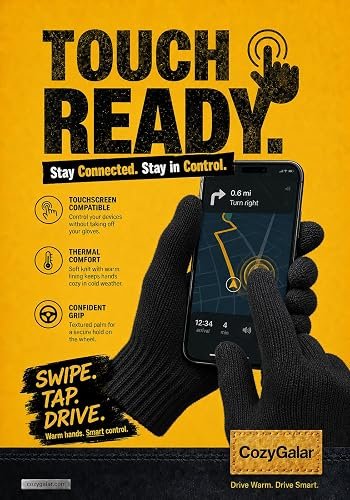
Most modern phones use capacitive touchscreens. A bare finger changes the screen’s electrical field; a compatible glove uses conductive material to carry that interaction through the fingertip. Ordinary knit fabric acts as a barrier, so a small gap, folded seam, worn conductive area, or dirty display can be enough to interrupt a tap.
The useful way to troubleshoot is to treat the glove, its fit, and the phone as one contact system. Replacing the gloves before checking the other two parts can waste money without solving the problem.
Which eight fixes solve the most common problems?
Pinch the end of the glove and seat your finger inside the conductive area. Loose fabric beyond the finger can bend instead of transferring a clear touch.
Oil, snow, condensation, or water can interfere with consistent input. Apple and Google both recommend starting touchscreen troubleshooting with a clean screen.
Lay the conductive area flat on the display instead of tapping with the edge of a seam or the fingernail. A larger, steady contact area is easier for the phone to detect.
If the thumb works but the index finger does not, the issue is likely fit, position, or wear at that fingertip rather than the whole phone.
Temporarily test the phone without a thick or damaged protector if it is safe to do so. Google notes that screen protectors can affect response on Pixel phones.
Some devices include Screen Protector Mode, Adaptive Touch, or a similar display option. Names vary by model, so check the phone manufacturer’s instructions.
Damp fabric can shift the contact point or cause irregular input. Air-dry the gloves completely before judging whether the conductive tip has failed.
If the same area of the display misses taps without gloves, the phone or app may be the problem. If only one glove fingertip fails across several devices, inspect that tip for wear or damage.
How should touchscreen gloves fit?
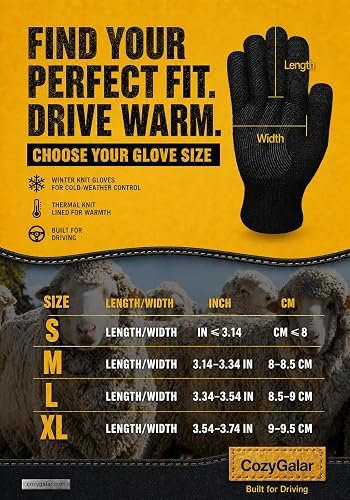
A good touchscreen fit is close at the fingertip without squeezing the hand. Too much empty space allows the conductive area to fold away from the screen. A glove that is painfully tight, however, can limit comfort and dexterity.
Measure your hand before ordering and compare it with the brand’s size chart. Pay attention to finger length as well as palm circumference. If you are between sizes, decide whether your priority is a closer touchscreen feel or more room for comfort.
Can a screen protector make touchscreen gloves less responsive?
Yes, it can. A protector adds another layer between the conductive fabric and the touch sensor. The effect varies by protector thickness, installation quality, device, and the phone’s sensitivity settings.
Google’s Pixel troubleshooting guidance recommends testing without a case or screen protector and, on supported models, trying Screen Protector Mode or Adaptive Touch. Apple likewise recommends removing cases or screen protectors when an iPhone or iPad responds intermittently. That does not mean every protector is incompatible; it means the protector is a variable worth isolating.
Does warmth compete with touchscreen accuracy?
Often, yes. More insulation can add bulk around the fingertips, while high-precision typing benefits from a closer, thinner contact point. The goal is not to find a glove that feels identical to bare skin. It is to choose the right balance for the task.
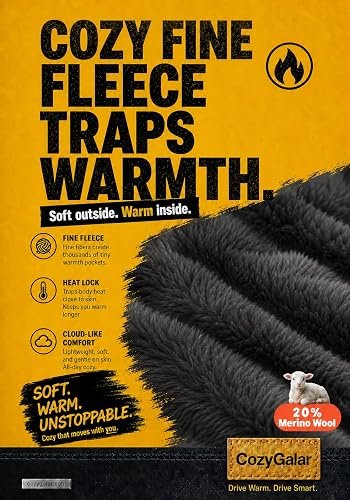
For everyday commuting, dog walking, and checking navigation while stopped, a flexible fleece-lined knit can provide practical warmth with useful phone access. For prolonged exposure below 20°F, wet snow, or severe wind, prioritize hand protection and consider heavier mittens or layering even if touchscreen precision decreases.
Can washing damage touchscreen performance?
Heat and rough treatment can change a glove’s fit or stress its conductive area. Follow the product’s care directions rather than assuming every touchscreen glove is machine washable. CozyGalar’s current guidance is to hand wash in cold water, reshape gently, and air dry. Do not bleach or tumble dry.
If response changed after washing, let the gloves dry completely, reseat each fingertip, and test them on a clean screen. A glove that remains stretched or misshapen may no longer keep the conductive area in close contact.
How can you tell whether the glove is worn out?
Test the same fingertip on more than one compatible device after completing the basic checks. Visible thinning, a hole, a separated seam, or a conductive patch that no longer reaches the finger are stronger signs of glove wear. If every fingertip suddenly stops responding on one phone, investigate the phone, protector, settings, or software first.
Do not apply unknown conductive paint, foil, or adhesive to a glove you plan to wear outdoors. A temporary hack can create hard edges, stain the screen, or make the glove uncomfortable. Replacement is the more sensible option when the conductive construction is physically damaged.
What do customer observations tell us?
Individual reviews cannot prove that a glove will work with every device, but they can confirm which real-life benefits buyers notice. One verified CozyGalar purchaser specifically mentioned both warmth and screen use:
“These are warm, and you can use a screen no problem.”
Amazon Customer · Verified Purchase
That is encouraging product-specific evidence, not a universal compatibility promise. Your phone model, protector, hand size, and fingertip position still matter.
What is the bottom line?
When touchscreen gloves stop working, check contact before assuming failure: seat the fingertip, clean and dry the screen, use a flat touch, isolate the protector, review sensitivity settings, and test another device. Fit is the hidden variable that connects nearly every step.
If you are still shopping, our touchscreen glove buying guide explains conductive construction and dexterity. For cold commutes, see the guide to warm, grippy winter driving gloves. You can also review CozyGalar’s materials, care, and fit details on the product guide homepage.
Need warm gloves with everyday phone access?
CozyGalar wool-blend gloves combine a fleece-lined interior, conductive fingertips, and a textured grip. Check the size chart before ordering for the closest practical fingertip fit.
Sources and disclosure
- Google Pixel Help: fix touch and response issues
- Apple Support: if the screen is not working on iPhone or iPad
Product facts and the quoted review come from CozyGalar’s current product materials and verified Amazon listing feedback. This page contains an affiliate link; CozyGalar may benefit from qualifying purchases without changing your price.
Pingback: Best Winter Gloves for Dog Walking: What to Look For
Pingback: How to Wash Touchscreen Gloves Without Damage - CozyGalar